
Yes, EE has live chat.
Where
Open the EE app, go to Help, scroll down to Talk to us and select Message us, then New Conversation.
Yes
Bot first
Checked 9 Oct 2026
Advertisement
[AdSense in-content slot 1]
Where to click
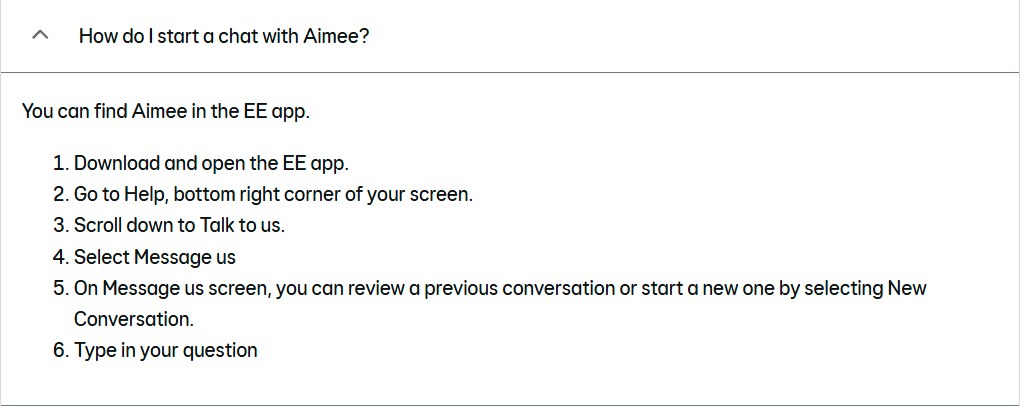
Open the EE app, go to Help, scroll down to Talk to us and select Message us, then New Conversation.
About EE live chat
EE’s chat is in the EE app. Aimee, EE’s digital assistant, answers first and is available at any time of day. If you need more help, Aimee connects you to an EE Guide on live chat. To start a chat, open the EE app, go to Help, scroll down to Talk to us and select Message us.
EE doesn’t publish live chat hours. It says that if you need a Guide outside opening hours, you may need to wait until the morning.
Other ways to get in touch
Phone (mobile): 150 from your EE mobile, or 07953 966 150 from any other phone. Mon–Fri 8am–9pm, Sat–Sun 8am–8pm.
Phone (broadband and landline): 150 from your EE mobile, or 0330 123 1105 from any other phone. Mon–Fri 8am–9pm, Sat–Sun 8am–8pm.
Digital call menu: text HELLO to 150 from your EE mobile.
Complaints form: online complaints form, linked from EE’s Make a complaint page (EE says it currently replies within 7 days).
Post: EE Customer Services, 6 Camberwell Way, Sunderland, Tyne and Wear SR3 3XN.
Phone (broadband and landline): 150 from your EE mobile, or 0330 123 1105 from any other phone. Mon–Fri 8am–9pm, Sat–Sun 8am–8pm.
Digital call menu: text HELLO to 150 from your EE mobile.
Complaints form: online complaints form, linked from EE’s Make a complaint page (EE says it currently replies within 7 days).
Post: EE Customer Services, 6 Camberwell Way, Sunderland, Tyne and Wear SR3 3XN.
If you need to complain
Complain to EE first and ask for it to be logged. If it isn’t sorted within 6 weeks, or you get a final ‘deadlock’ letter, you can take it to the Communications Ombudsman for free.
Compare with other suppliers
SMARTY